
Benchmark equity offers for employees and advisors
In this article group
- Granting Your Employee Options
- Send Option Grants for Board Approval
- Require a Company Signature on Option Grants
- Check whether your option grants are ISO or NSO
- How to enable early exercise for your employees
- Edit Option Grants After Issuance
- Option Repricing
- Allow Employees to Nominate a Trust for Their Options
- Stock Option Offer Statuses and What They Mean
- How to set up equity approval workflows
Worth exploring
Benchmarking helps you work out how much equity to offer a new hire or advisor, using real data from thousands of Cake equity grants. You can view market medians and typical ranges for a role, then draft an option offer straight from the insights.
Go to Equity plans → Benchmarking in the left-hand menu.
Choose the seniority level and role you're hiring for (e.g. Junior Advisor).
Select your company's funding stage — Seed or Series A.
Click Find out! to see the recommended equity for that role, including the median and the typical range across comparable companies.
To turn the benchmark into an offer, pick the equity level you want to use from the dropdown (defaults to the median) under Draft an offer using.
Click Draft option offer to generate an offer letter pre-filled with the benchmarked equity amount.
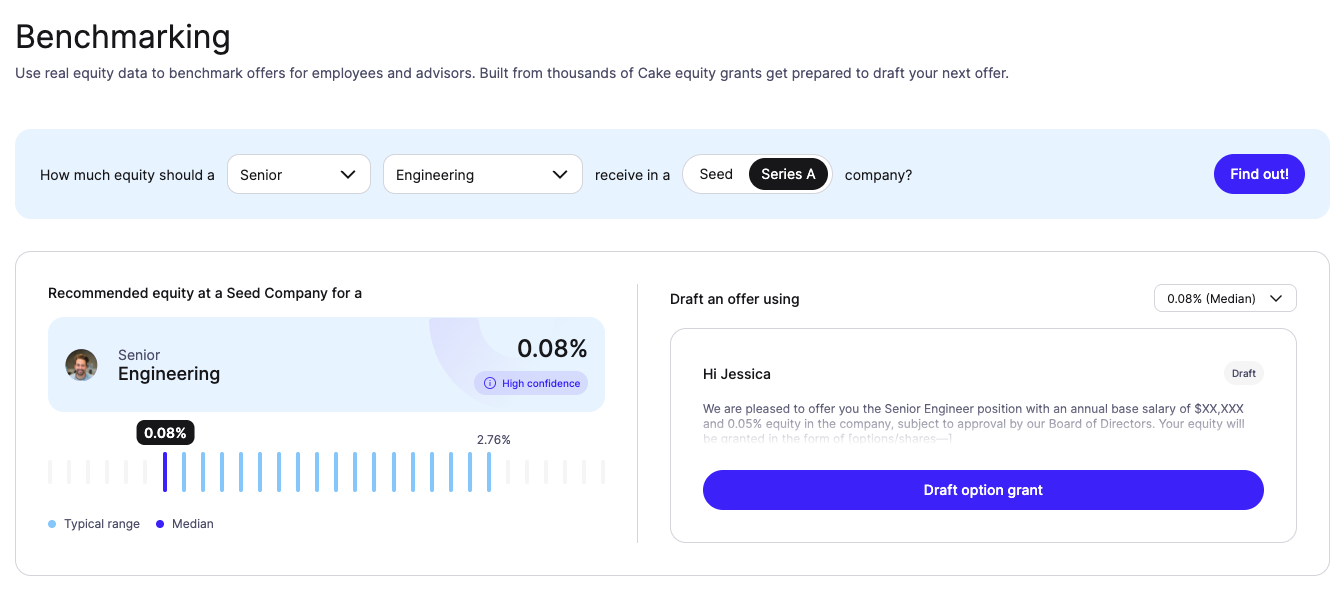
Your draft offer is ready to review and send as part of your normal granting workflow. Check out: Create a new option grant