
Create and Manage Lists
Lists let you organize your stakeholders so you can send messages or share documents with a whole set of people at once. There are two types: Smart Lists that update themselves from rules you set, and Static Lists you build by hand.
How Lists work
Smart Lists are rule-based and auto-updating. You define rules (for example, "Country is US"), and Cake keeps the members current as your cap table changes - no manual upkeep.
Static Lists are a fixed set of people you pick yourself. Members only change when you edit the list.
Lists are used in two places: Communications (message everyone on a list) and document sharing (share a folder or file with a list).
Create a Smart List
Go to People → Lists.
Click New list and select Smart list.
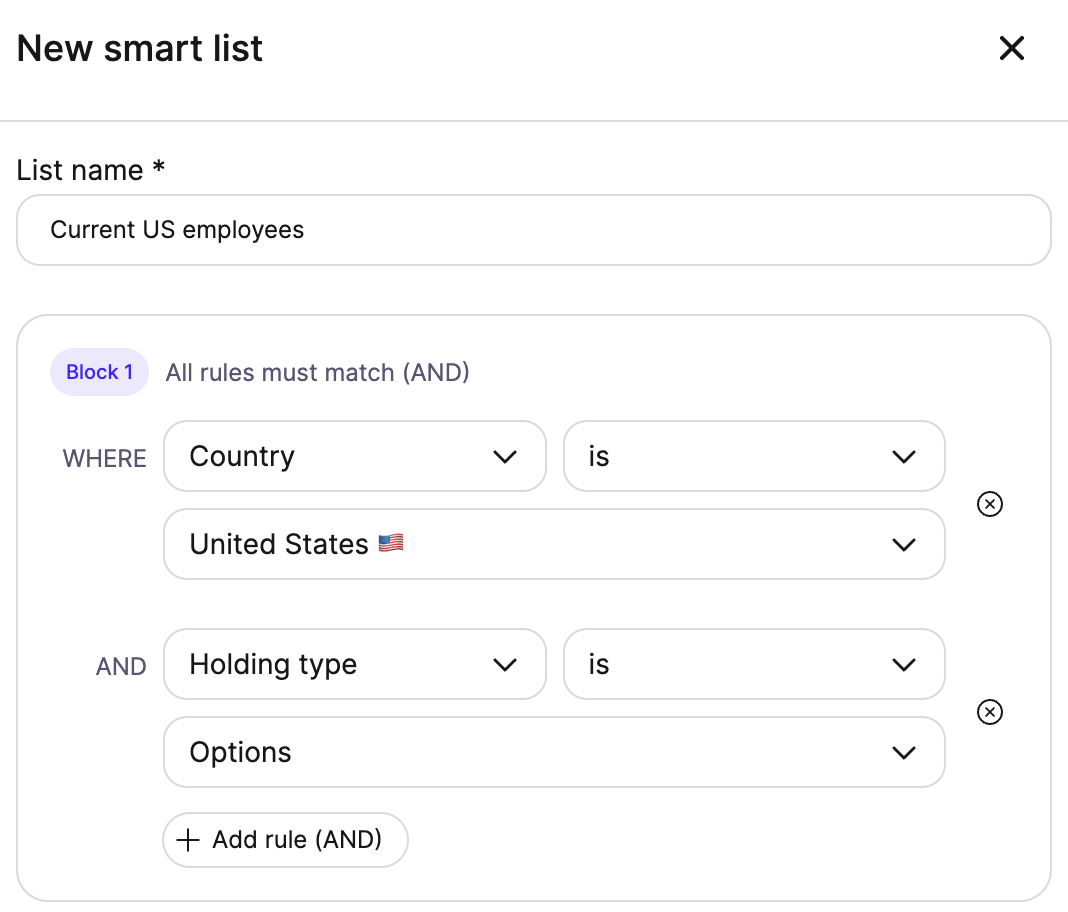
In the rule builder, add a rule. Each rule has an attribute, a condition, and a value - for example, Holding type / currently is / Options. Available attributes include:
Holding type (currently is, or has ever been): Shares, Options, SAFE, Convertible Note
Share class (is / is not)
Country (is / is not)
State (is / is not)
Officeholder (is / is not)
Beneficiary (is a beneficiary of) - a beneficiary of a bare trust or SPV
Combine rules to narrow or widen the list. Rules inside the same block use AND (all must match); separate blocks use OR (any can match).
Watch the member count update as you build, so you can see exactly who matches.
Name the list and click Save.
Create a Static List
Go to People → Lists.
Click New list and select Static list.
Add people by searching for existing stakeholders, or filtering your contact list to select the relevant stakeholders.
Name the list and click Save.
Edit a list
Open the list from People → Lists.
Use the actions menu and select ✏️ Edit. For a Smart List this reopens the rule builder; for a Static List you can add or remove people.
Save your changes.
Send comms to a list
Open a list and click Send comms. This starts a new message with the list already set as the recipient.
Delete a list
Open the list and select 🗑️ Delete from the actions menu.
Confirm. Note what happens:
Documents and files shared with this list are unshared.
Messages already sent to the list stay in recipients' inboxes.
This can't be undone.
What happens next
Smart Lists keep themselves current - as people gain or lose a holding, or their details change, membership updates automatically. Static Lists stay exactly as you set them until you edit them.